

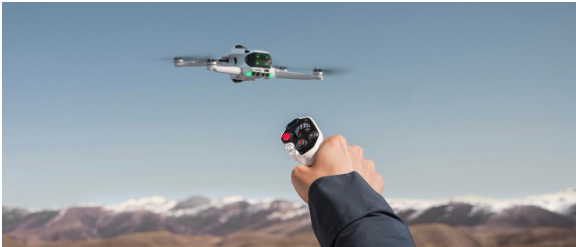
Drone controls feel easiest when they match how a beginner already understands movement. Most new pilots learn fastest with simple directional inputs, obvious feedback, and a reliable way to stop or come back home. That makes control style more important than raw speed or advanced camera features. The main options usually fall into three groups: motion controls, traditional dual sticks, and app-based controls with automated flight actions. Each can work for a first drone, but they create very different learning curves. Knowing those differences helps you choose a drone you will actually enjoy flying.
How Do the Main Drone Control Methods Compare?
Motion Controls Versus Traditional Sticks
Motion controls usually feel easier first because they reduce the number of decisions a beginner must make at once. Instead of managing two sticks for throttle, yaw, pitch, and roll, you point or tilt a controller and the drone follows that direction. This feels closer to natural hand movement, so many new pilots gain confidence faster. Traditional sticks offer finer control and build stronger piloting skills over time, but they demand more coordination from day one. For a newbie, sticks can feel technical and slightly abstract. If your goal is quick, low-stress flying, motion control often wins. If your goal is mastering manual inputs, sticks remain the better training tool overall.
App Controls and Preset Flight Actions
App controls are often the least intimidating way to start because the screen presents clear buttons, guided prompts, and preset actions. Tap-to-takeoff, follow modes, orbit paths, and automatic recording moves can help a beginner capture usable footage without learning full manual control. The tradeoff is feel. Touchscreens do not provide the tactile response of a physical controller, so precise movement can feel less connected. App flying also depends on a clean interface and stable phone handling. For short, simple flights, app control works well. For building confidence in steering through space, it usually serves best as a stepping stone between full automation and dedicated controller-based flying for many new users.
What Makes Drone Controls Easier to Learn?
Clear Movement Inputs and Flight Feedback
New pilots improve fastest when each input produces an obvious result. Push forward, the drone moves forward. Point right, it tracks right. That one-to-one relationship reduces hesitation and helps a beginner predict motion before making the next command. Good feedback matters just as much. A live view, stable horizon, speed cues, and clear indicators for direction, battery, and signal all make the aircraft feel less mysterious. When feedback is delayed or cluttered, beginners often overcorrect. The easiest drone controls combine simple commands with immediate visual confirmation. That lowers cognitive load, shortens the learning curve, and makes early flights feel controlled rather than confusing or stressful for most first-time flyers.
Accessible Stopping and Return Commands
Beginners trust a drone more when they know they can interrupt a maneuver instantly. An easy-to-reach stop button, hover command, or pause function prevents small mistakes from becoming larger ones. Return-to-home is equally important because it gives new pilots a clear recovery option if orientation slips or nerves kick in. The best beginner control systems make these safety actions obvious, not buried in menus or hidden behind complex combinations. Simple emergency responses also encourage practice, since people learn faster when they are not afraid of losing control. Easy flying is not only about steering smoothly. It is also about recovering smoothly, which is what turns early uncertainty into repeatable confidence.
Would the Antigravity A1 Suit Your Preferred Flying Style?
Assess Point-to-Fly Control and the Goggles Experience
The Antigravity A1 is a drone for newbie pilots who prefer pointing over traditional sticks. In FreeMotion mode, point the Grip controller in your intended direction and pull the trigger to move. FPV mode translates wrist movements into flight inputs. The Vision goggles provide 2560 × 2560 resolution per eye and an approximately 90° diagonal field of view. You can look around in FreeMotion mode without changing the flight direction, while Navigation Assist keeps the forward view visible. This setup combines directional inputs with immersive viewing, although its suitability depends on your comfort with goggles and whether you prefer motion controls or conventional sticks during your initial flights.
Consider Simulator Practice and 360 Filming
The A1’s built-in flight simulator lets beginners practise controls in virtual environments before flying outdoors. Repeating basic movements can help you become familiar with the controller before your first launch. Its 8K 360° video recording also allows you to select viewing angles after landing, including forward, side, backward, and top-down perspectives. You can concentrate on smooth flight paths and adjust framing later. The 8K resolution covers the full panorama; reframed resolution depends on the selected view. Sky Genie offers eight automated aerial moves, including Arc Shot, Spiral Ascent, and Oval Orbit. These features support practice and filming, while usable results still depend on careful flight planning and steady control throughout each session.
Conclusion
For most newbies, the easiest drone controls are motion-based systems with clear feedback and fast safety commands. Traditional sticks remain valuable, but they usually take longer to feel natural. App controls are friendly at first, though they can feel less precise once you start steering more actively. If your goal is simple, intuitive flight, a pointing-style controller is the strongest fit. The Antigravity A1 stands out for beginners who want that experience, especially with its Grip motion controller, immersive goggles view, and simulator-supported learning path that helps turn first flights into confident habits.
